In this article
Separate the evidence, approval and payment stages so you can identify the next useful action without guessing when money will arrive.
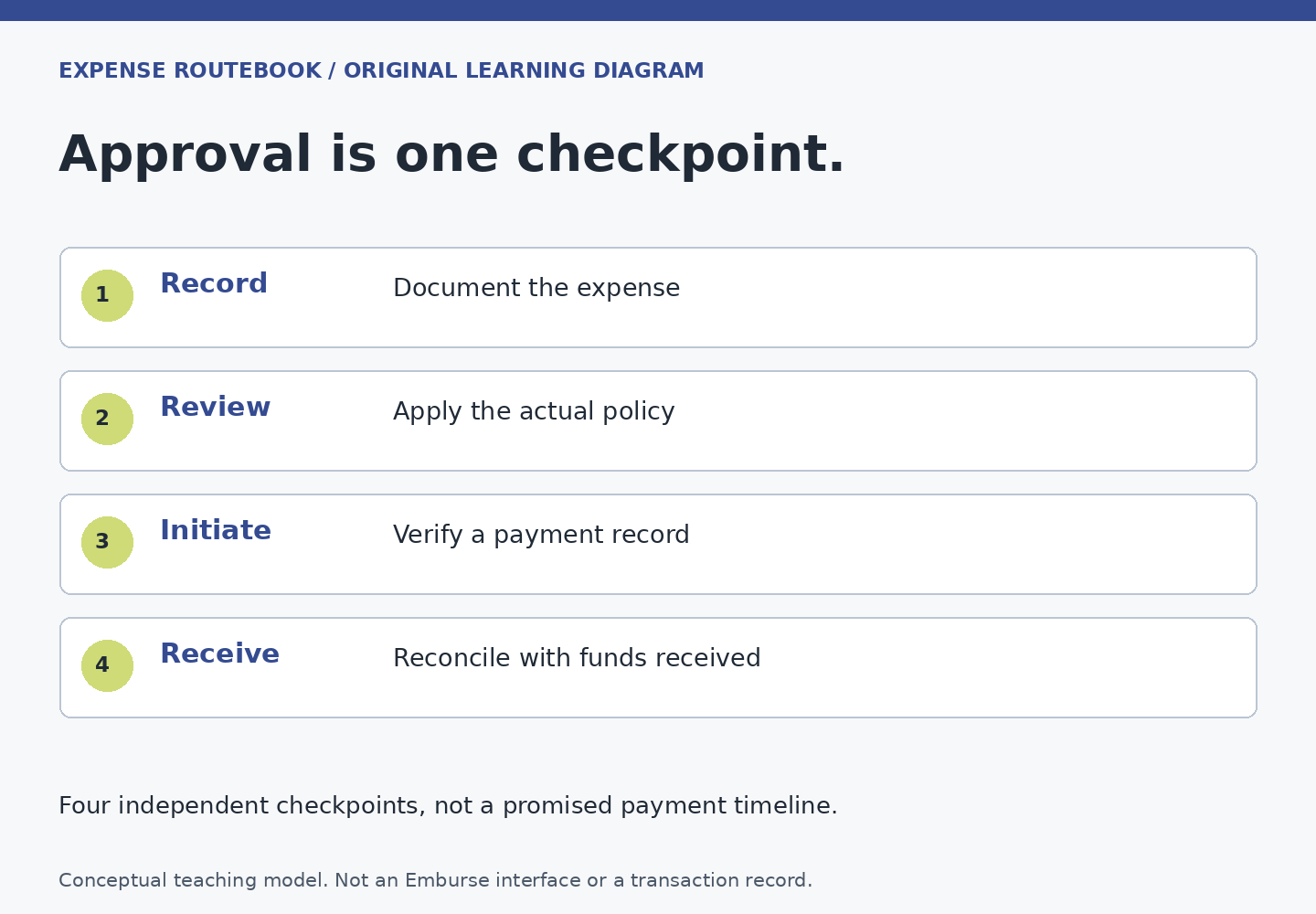
An expense can be recorded correctly, approved by a manager and still not have reached the employee’s bank account. Those statements are compatible. Each describes a different part of the process. The practical way to follow a reimbursement is to identify the product, establish what amount is actually owed to the employee, and find the last stage supported by evidence.
This guide offers an editorial model for organizing those checks. It is not an official Emburse workflow or a promise about your employer’s payment arrangements. Use your organization’s terminology when recording what the screen says. If the product is uncertain, start with the product identification guide.
First, distinguish reimbursement from payroll
Do not assume an expense payment will arrive with wages. The official Emburse Spend reimbursement page describes eligible ACH reimbursements as separate from payroll. It also identifies company-selected payout schedules and generally describes ACH settlement as taking two to six business days after a payout begins. Setup, account status and bank factors matter. That Spend description does not establish the payment route used by every Professional or Enterprise customer.
For your own claim, ask finance one bounded question: “Which system releases this reimbursement, and what event starts its payment timetable?” The answer might point to a configured service, an employer payment process or another approved arrangement. Record the answer without inferring tax treatment, employment rights or a guaranteed date. Those are separate questions for the appropriate qualified person.
Stage 1: establish the expense record
Start with the economic event: what was bought, when, for what work purpose and who paid. A receipt in your email is evidence, but it does not by itself establish that a claim exists in the expense system. Likewise, saving a photo may be different from saving an expense, adding it to a report or submitting that report.
Your evidence for this stage is a saved expense or report reference that you can reopen. Check the date, currency, category and amount against the original document. Review any imported card transaction before creating a replacement manually. If you are unsure what evidence is adequate, use the receipt evidence check.
Keep a short unresolved list: missing hotel folio, unclear meal attendees, or card transaction not yet imported. Give each item an owner and next action. This prevents a half-finished record from looking complete simply because its total is visible on a dashboard.
Stage 2: establish the reimbursable amount
A report total is not automatically a payment request for that full amount. Company-paid charges, employee-paid expenses, personal portions, adjustments and disapproved items can have different consequences. Professional’s report field definitions distinguish overall expense amounts from reimbursable amounts. Use the relevant totals and line details in your own configured system.
Write down three numbers only when you understand how they were produced: total recorded spend, the employee-reimbursable amount, and any unresolved difference. Keep the currency attached to every figure. If the report contains several currencies, do not add original-currency values together and label the result a reimbursement total.
Our corporate-versus-personal-card guide helps separate the payment instrument from the purpose of the purchase. Paying with a personal card does not make an otherwise ineligible purchase reimbursable. A company-card transaction can still need reporting even when it creates no payment to you.
Stage 3: establish successful submission
Look for a submission event or the product’s corresponding confirmation, rather than relying on memory of clicking a button. A missing field, pending review or interrupted connection can leave work unfinished. Record the submitted reference, timestamp and visible state. Reopen the record if necessary to confirm that it is no longer merely an editable draft.
If the system asks for an explanation, provide truthful context about that specific line. A warning is not an invitation to choose a different category simply to get past the check. When the rule appears wrong, ask the policy owner to resolve it. Preserve the original facts while the question is open.
Stage 4: identify who holds the approval handoff
Approval may involve more than the manager you first notified. A project owner, budget holder, specialist reviewer or finance team may need to act. For Enterprise, the official business rules description confirms that policy and routing rules are organization-specific. You cannot infer the next approver from a coworker’s experience in another department.
Use the visible history to distinguish “waiting for a person” from “waiting for your answer.” If a reviewer requested a receipt, sending a general reminder to approve the report will not solve the missing evidence. If a reviewer is absent, ask the administrator about the authorized cover process rather than sharing accounts or rerouting the claim informally.
A good handoff message gives the reference, the last recorded action and the specific decision needed. “Can you confirm whether report ER-204 needs my response or another approver?” is easier to answer than “Any update?” The reference here is fictional; use your own approved internal channel.
Stage 5: separate approval from payment release
In Professional, the public status guide describes an approval workflow, payment-related folders and approval history. It also describes the user marking a reimbursed report paid. A folder name alone is therefore insufficient proof that money arrived at your bank.
Ask the payment owner whether the approved amount has actually been scheduled or released, by which route, and with what reference. Capture only the information you need to follow the transaction. An accounting export, an approval email and a payment instruction are different records; determine which one you have before escalating.
If no payment instruction exists yet, the useful owner is usually the team responsible for that handoff. A bank cannot trace a transfer that the payer has not initiated. If payment has been released, finance can tell you which reference and date are appropriate for the next inquiry.
Stage 6: verify receipt and reconcile differences
Check your own bank records through a trusted route. Compare the credited amount and currency with the confirmed payment, allowing the payment owner to explain any legitimate batching or adjustments. Do not assume a similar-looking deposit is the reimbursement merely because the date is convenient.
If the credit is missing, ask whether the payment is pending, failed, returned or otherwise unresolved. Use the missing reimbursement decision guide for a focused escalation. Never submit the expense again as a way to force a second payment attempt.
A fictional mixed-card report
Mateo’s trip record contains a company-paid hotel charge of 420, an employee-paid rail ticket of 64 and employee-paid supplies of 26, all in the same fictional currency. The total recorded spend is 510. Before any policy adjustments, the employee-paid portion is 90. Expecting a 510 deposit would confuse the report’s documentation role with its reimbursement role.
The reviewer asks for the supplies receipt. Mateo attaches it to the existing line and confirms the report moves forward. Finance later says the 90 reimbursement has been released. Mateo checks the corresponding bank credit, records that it matches, and closes the item. If the report instead showed an adjusted payment of 80, he would ask for the line-level explanation before treating the difference as a bank error.
A completion test you can reuse
- The expense evidence is attached to the correct existing record.
- The reimbursable amount is understood, including excluded or adjusted lines.
- Required reviewer questions are resolved and the final approval stage is known.
- The payment owner has confirmed release or explained why no employee payment is due.
- The expected bank credit has been matched, or an unresolved payment case has a clear owner.
The aim is not to check every screen repeatedly. It is to keep one reliable account of the last proven event and the next owner. That makes a normal wait easier to distinguish from a stalled handoff, and it reduces the temptation to create duplicate claims when the real problem sits later in the route.